Log In Register

Anyone Use Autopilot Greenhouse Master With Computer Software?

  • Thread starter Thread starter Westie
  • Start date Start date
  • Tagged users Tagged users None

Anyone Use Autopilot Greenhouse Master With Computer Software?

Westie 53 Replies 6,201 Views
Page 3 of 3 · Replies 41–54 of 54
Remove unit from grow.
Place sensor outside, NOT near anyone, any vehicles, etc. Turn on unit, press co2 calibration button, let it do its thing. I set mine to a 380ppm ambient. Imo, that's what ambient is, unless u live in LA or the like. If in LA or the like, set ambient to 400-450 tops. Should take 30 mins.
Put monitor and sensor back into grow.
 
Always, and I mean always calibrate any co2 monitor prior to operation.

Also, my ac port shorted out 1x. Glad it was warrantied. Now I bought a 2nd one as a back up. My girls need their climate control and co2.
 
Not sure how I didn't notice the Calibrate button in the middle but I haven't been doing that at all. I actually don't have the greehouse controller but use the other three. Lighting, CO2 and enviromental. Best get on it.
 
Sampling (how often the PC app reads from the Autopilot controller, updates screen, and writes to computer logs) can be set to 5, 10, 15, 30, or 60 seconds.
I just keep it at 5s for the most granularity. No need to worry about file sizes being too big.
 

Attachments

  • sample.JPG
    sample.JPG
    114.6 KB · Views: 113
Last edited:
Autosave. Saves log file to disk every so often. 5, 10, 15, 30, or 60 minutes.
For when computer chit goes wrong. lol
 

Attachments

  • autosave.JPG
    autosave.JPG
    51.1 KB · Views: 103
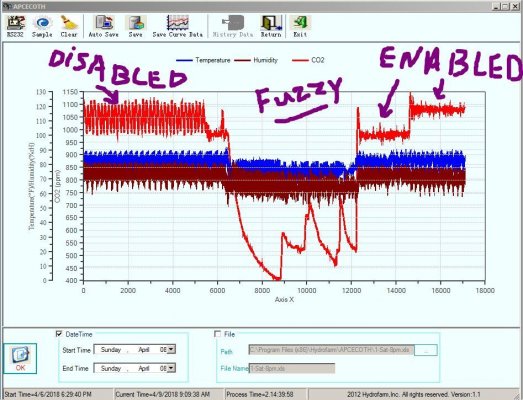
Graph shows 24hr period.

Co2 Fuzzy logic - enabled / disabled test result.
For both tests, Co2 deadband set to 25. (lowest allowed)
By design, and as evident (proven) on the graph, when enabled the controller maintains a much tighter Co2 PPM span than when disabled.

Note: I have the Co2 regulator flow set to almost the bare minimum. Using rain tubing.
 

Attachments

  • fuzzy.JPG
    fuzzy.JPG
    131.9 KB · Views: 101
This is about as tight as I can get on the Co2. :)
Standalone Dehuey limited to 5% adjust increments.....doh.

Current unit settings highlighted.
 

Attachments

  • Capture.JPG
    Capture.JPG
    109.4 KB · Views: 104
  • Capture2.JPG
    Capture2.JPG
    134.6 KB · Views: 104
ok, one last boring history graph. This one covers 3 days.

I use the software to make all setting changes, no need to use the controller keypad.
(Co2 fuzzy, must touch panel to enable/disable)

Shows where I bumped Co2 up each day by 100ppm. Now running 1200.
 

Attachments

  • Capture3.JPG
    Capture3.JPG
    95.9 KB · Views: 99
Oh yeah. This software only needs an old crusty pc or laptop running windows 7 or above that can be within 15 feet of your controller. The laptop I'm using is old and slow, the keyboard is all effed up and barely works.....was sitting in the closet. (With a USB extension cable....up to 30ft I think, you can get even farther from controller...45ft or more)
Food for thought.
 
Oh yeah. This software only needs an old crusty pc or laptop running windows 7 or above that can be within 15 feet of your controller. The laptop I'm using is old and slow, the keyboard is all effed up and barely works.....was sitting in the closet. (With a USB extension cable....up to 30ft I think, you can get even farther from controller...45ft or more)
Food for thought.
I’m really hoping your still around. I just purchased this adapter and it will be here in the morning. I actually joined this site, just so I could talk to you. While waiting on it I have been working on trying to set up my Remote Desktop so that I can take over my computer at home with my iPhone. So far I can do it as long as I’m on my WiFi with my phone, which the lab top is too, I can do it. Sitting up the gateway is my issue.
Did you ever hook to your computer from somewhere else to have control over the autopilot?
 
Shit, I can't begin to tell u how many times I've accidentally hit that fn button. Lots, then supa panic sets in as I hate calibrating this thing. It's a pita to remove, calibrate, wipe clean, then reinstall.
How do you calibrate it?
 
ok, one last boring history graph. This one covers 3 days.

I use the software to make all setting changes, no need to use the controller keypad.
(Co2 fuzzy, must touch panel to enable/disable)

Shows where I bumped Co2 up each day by 100ppm. Now running 1200.
Bro I need your help badly. It says could not find any com port?
 

Attachments

  • image.jpg
    image.jpg
    682.7 KB · Views: 53
  • 928F2A96-484F-45C2-94C3-7DCC8D32CE26.jpeg
    928F2A96-484F-45C2-94C3-7DCC8D32CE26.jpeg
    384.2 KB · Views: 46
Page 3 of 3 · Replies 41–54 of 54
Back
Top Bottom