Log In Register

Anyone Use Autopilot Greenhouse Master With Computer Software?

  • Thread starter Thread starter Westie
  • Start date Start date
  • Tagged users Tagged users None

Anyone Use Autopilot Greenhouse Master With Computer Software?

Westie 53 Replies 6,201 Views
Page 1 of 3 · Replies 1–20 of 54
Westie

Westie

Posts
557
Reactions
1,686
Joined
Feb 15, 2017
Points
143
Considering this product. Any feedback appreciated
Autopilot part number APCEIC.
Thanks.
 
I run the master green house controller. I don' use the computer setting
 
Thanks, DT. In fact, I looked into this unit because you use, and recommend it.

Went ahead and ordered both the controller and software from my local hydro-hut.

Retired now. Worked in IT as a systems and network engineer for 35yrs.

I'll post a review l once I get enough experence with it.

Thanks.
 
Software is a phone line plugged into unit, then plugged into laptop. Then u can access th unit.

Blueprint bdac2 is same autopilot copy
 
That's my understanding.

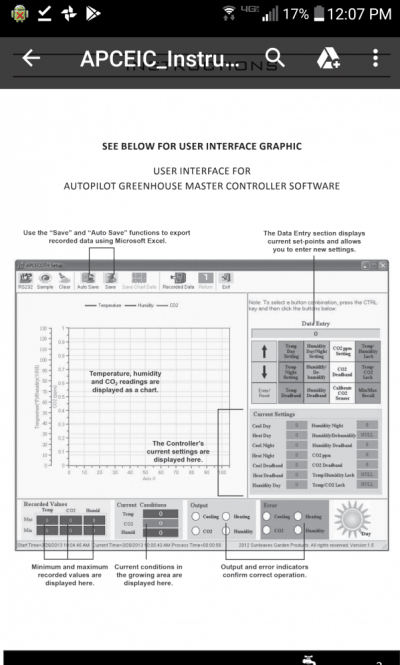
Includes a USB to serial adapter for computer connection, and cable for connecting to the serial RS232 port on the controller.

Here's a screenshot from the instructions.
 

Attachments

  • Capture+_2018-03-17-12-07-44.png
    Capture+_2018-03-17-12-07-44.png
    79.4 KB · Views: 302
True remote access......requires one to take remote control of the above computer.
(PCAnywhere type software).
Ezpz. Been doing that for decades.

Thanks!
 
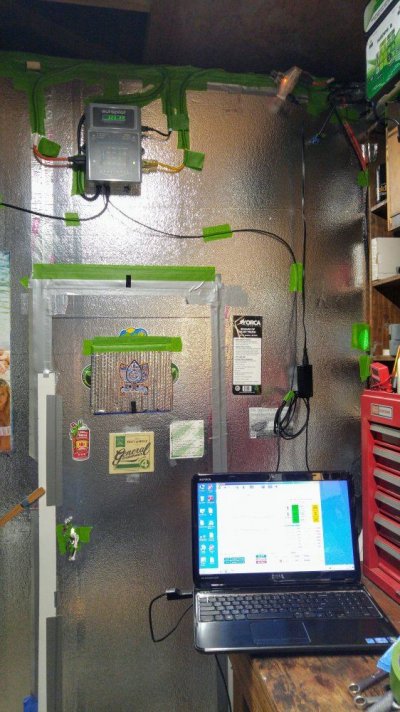
Computer connect kit arrived.
Getting first looks at functionality.
For starters, nice having all the current unit settings displayed.
 

Attachments

  • 0404181429.jpg
    0404181429.jpg
    128.6 KB · Views: 265
Just the computer connect kit is about $70.
Cable connected via computer USB port.
 

Attachments

  • 0404181137.jpg
    0404181137.jpg
    127.2 KB · Views: 248
  • 0404181513.jpg
    0404181513.jpg
    126 KB · Views: 250
Controller looks like it’s a decent price too. Will be following this thread to see your experience with it.
 
Displaying saved history for about 4 1/2 hours of data.
(I was jacking around with Co2 settings.)
 

Attachments

  • AP0.JPG
    AP0.JPG
    114.1 KB · Views: 239
Last edited:
Here is a snapshot of the Raw (unmodified) data in excel file. These can be created using the save, and/or auto save functions. The controller does NOT store any data, the application has to be running on a computer, logging, storing the controller activity as it occurs.
 

Attachments

  • Raw-Data.JPG
    Raw-Data.JPG
    123.3 KB · Views: 224
I got one of those and I got an Iponic 624 with link4. That controller from what i got out of it wasn't true remote. The Iponic is definitely remote controlled. I have been in Cuba messing with my setup and in Hawaii no problem.
 
I ended up just giving it to my homie. It's good just bright. Dont have it in the tent.
 
The iponic gear is absolutely fabulous, of top shelf quality, but it's also priced accordingly.

The Autopilot software is primarily providing 3 things when cable connected to a computer.

1. View and change controller settings.
2. View and log controller activity.
3. View and display history logs.

All of the above CAN be done truly remote, by using another computer to take "remote control" of the computer doing the logging.
 
Absolutely right westie, that auto is a fine product that does the job well and good priced
 
I also found.....no Fuzzy in software.

The Co2 Fuzzy logic mode can only be changed using the Autopilot keypad.
Fuzzy status, not viewable in software.

There's an led on the face of the Autopilot that show Fuzzy status. (They say Fuzzy is only for compressed Co2.)

No biggie since its usually a set and done dealio.
 
Page 1 of 3 · Replies 1–20 of 54
Back
Top Bottom