Log In Register

Taking pictures in blurple light?

  • Thread starter Thread starter Nate_in_AK
  • Start date Start date
  • Tagged users Tagged users None

Taking pictures in blurple light?

Nate_in_AK 18 Replies 4,358 Views
Page 1 of 1 · Replies 1–19 of 19
1
Nate_in_AK

Nate_in_AK

Posts
738
Reactions
1,009
Joined
Mar 10, 2020
Points
143
Is there any wizardry to taking pictures in blurple? My guess is there is not, but I tried using a DSLR and a custom white balance card, but it still looked like death. I'm thinking the blurple lights have zero green spectrum, so it is impossible to get a real picture... or is there a trick? (Yes, I know the trick is to lift the garbage can lid enough to cram the blurple light in, then order a good LED light. I'm poor so I'm not doing this anytime soon.)
 
Is there any wizardry to taking pictures in blurple? My guess is there is not, but I tried using a DSLR and a custom white balance card, but it still looked like death. I'm thinking the blurple lights have zero green spectrum, so it is impossible to get a real picture... or is there a trick? (Yes, I know the trick is to lift the garbage can lid enough to cram the blurple light in, then order a good LED light. I'm poor so I'm not doing this anytime soon.)
Wish I could help but as far as I know turn em off and use a different light source for pics ☹️
 
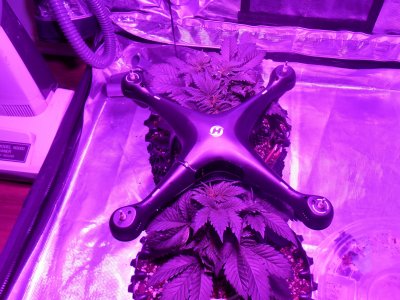
Does shooting through your grow glasses count? Excuse the quad, it was getting a Bondic repair cured.
 

Attachments

  • DSCN1938 (2).JPG
    DSCN1938 (2).JPG
    571.4 KB · Views: 453
  • DSCN1939 (2).JPG
    DSCN1939 (2).JPG
    772.7 KB · Views: 320
Is there any wizardry to taking pictures in blurple? My guess is there is not, but I tried using a DSLR and a custom white balance card, but it still looked like death. I'm thinking the blurple lights have zero green spectrum, so it is impossible to get a real picture... or is there a trick? (Yes, I know the trick is to lift the garbage can lid enough to cram the blurple light in, then order a good LED light. I'm poor so I'm not doing this anytime soon.)

Nope. No trick. Turn the off and use ANY other light source... lol

You are correct; the mix of wave length is a lot more than most cameras & filters can handle because of the mix of wavelengths. The very best i have seen under blurpurple have been those made using IR filters. They are almost BW but not quite.

You can get some pretty cool photos using a mix of lights but that is an entirely different discussion.

In all seriousness; simply try turning them off and using your cameras flash. Most cell phone cameras are at least 12mp so there is really no bad shot if you use the flash.

Good Luck & Happy Growing!! 🍻 🥂
 
If your light is programmable you can simply turn off the red and blue using only white and they'll look like HPS pics. Dial up the blue to about 10% and white at 100% and it will look fairly close to normal.

You can also adjust the pics on your pc with the Windows Photos program by clicking edit then click adjustments.
Bring up the pic and reduce all color to the point where it's almost black & white and then slide the red/green tint bar into the green until the pic looks how it would under natural light
 
Is there any wizardry to taking pictures in blurple? My guess is there is not, but I tried using a DSLR and a custom white balance card, but it still looked like death.

One thing is that the software you use will treat RAW and JPEG differently. Try both to find which works best.
 

Attachments

  • DSC04734a.JPG
    DSC04734a.JPG
    282.8 KB · Views: 288
It's a Google app. Pretty damn good for all photo tweaking.
I don't use Snapseed any more because I dumped everything google, but I did use it extensively. It's a very capable photo editing app. I would recommend it.
 
+1. Shooting in RAW will give you a tremendous amount more range in tweaking the image, though I don't think even RAW will fix bulple.

Agreed. I use DxO PhotoLab & Nix and it still takes some work to fix blurpurple. That is why i liked the cheat nate used. I am going to try it out in DxO and find out if it works there as well. If it works i will make a named filter out of it.
 
R

redshift75

Guest
if memore serves and i dont think I have much left. It takes a stack of filters for dslr and lots of post. Ill see if I can find the guide but you can almost reverse it by adding a blue blocker over a green filter with like a shaded filter in between. But I feel like I'm missing a filter. i just turn on a spotlight and turn off the blurple. Method sevon makes a filter for this. But I'm pretty sure its mainly just a green filter Blue + purple blocker with a green enhancer. shader for defining the edges and not washing them out. post for color enhancement back.

or try something like this and tell us if it works
https://www.amazon.com/mCOLT-Camera-Filter-Blurple-Spectrum/dp/B08SKTMZXJ
 
O use my led safety glasses on front of the lense it cuts out the pink in a flash
 

Attachments

  • IMG_20210414_070055.jpg
    IMG_20210414_070055.jpg
    786 KB · Views: 103
  • IMG_20210414_070024.jpg
    IMG_20210414_070024.jpg
    754 KB · Views: 98
Page 1 of 1 · Replies 1–19 of 19
1
Back
Top Bottom