Log In Register

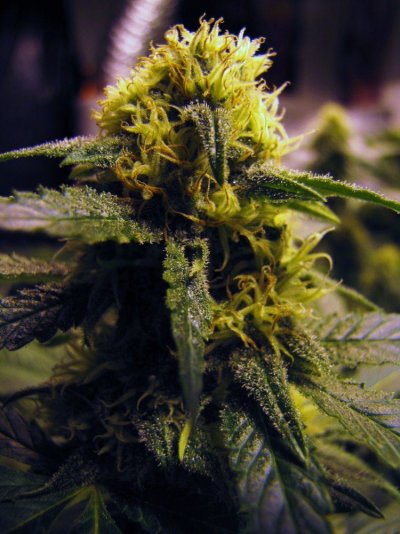
Cell Phone pics only. Bud Porn

  • Thread starter Thread starter robz
  • Start date Start date
  • Tagged users Tagged users None

Cell Phone pics only. Bud Porn

robz 19 Replies 6,111 Views
Page 1 of 1 · Replies 1–20 of 20
1
R

robz

Posts
343
Reactions
77
Joined
Sep 9, 2010
Points
28
So I'll start it off. Let's see what kind of quality pics peeps are getting with their cell cams. My phone is an iphone 4. Pics edited with a free iphone app.:icon_spin:
 

Attachments

  • new-phone-075.jpg
    new-phone-075.jpg
    133.9 KB · Views: 162
  • new-phone-056.jpg
    new-phone-056.jpg
    151.9 KB · Views: 144
Heres a few more..All with the iphone 4:icon_spin:
 

Attachments

  • grow juurnal 337.JPG
    grow juurnal 337.JPG
    130.5 KB · Views: 128
  • grow juurnal 330.JPG
    grow juurnal 330.JPG
    133.3 KB · Views: 110
  • grow juurnal 367.JPG
    grow juurnal 367.JPG
    121.9 KB · Views: 120
  • thanksgiving 2010 190.JPG
    thanksgiving 2010 190.JPG
    107.9 KB · Views: 113
  • thanksgiving 2010 222.JPG
    thanksgiving 2010 222.JPG
    139.9 KB · Views: 104
  • grow juurnal 407.JPG
    grow juurnal 407.JPG
    104.2 KB · Views: 117
  • thanksgiving 2010 215.JPG
    thanksgiving 2010 215.JPG
    119 KB · Views: 119
  • thanksgiving 2010 163.JPG
    thanksgiving 2010 163.JPG
    136.6 KB · Views: 110
  • thanksgiving 2010 236.JPG
    thanksgiving 2010 236.JPG
    189.5 KB · Views: 100
If you aren't legal, you probably don't want to upload pics from ur phone ;)

I got the evo 4g and it has an 8 meg camera that is useless indoors :(
 
If you aren't legal, you probably don't want to upload pics from ur phone ;)

I got the evo 4g and it has an 8 meg camera that is useless indoors :(

Legal medical grow here. What's the diff if I upload my pics to my PC from a phone or a camera? I don't understand your paranoia?
 
Those are some sick pictures! What app did you use to edit them?
 
Smart phones have GPS tags in them so you can see the GPS location of where the picture taken
 
Legal medical grow here. What's the diff if I upload my pics to my PC from a phone or a camera? I don't understand your paranoia?

I have zero paranoia, I'm legal and post pics everywhere, I've even signed over my confidentiality and am currently teaching a local law enforcement person. Paranoid is something I'm not,lol. That's why I began my statement with "If you're not legal...." and THIS is why. Just a heads up

Are the above pics taken with hps light? How do you eliminate the bars?

Edit- I just filmed the room with the single 600, no bars, then went to the room with 2 x 400's,....bars.
 
Take your pics ass soon as the lights are coming on or when they just go off. Sometimes they are just going to be there. I use Hortilux Red Blue mix bulbs and I can get nice pics ass soon ass the light comes on. CD
 
lmfao

Take your pics ass soon as the lights are coming on or when they just go off. Sometimes they are just going to be there. I use Hortilux Red Blue mix bulbs and I can get nice pics ass soon ass the light comes on. CD

Wow, I really just did that.....Look at the way i was spelling as in this last post. Redic....
 
i just posted this in another thread . . and it is relevant here as well.

whether your location is noted has to do with your phone/camera and its settings.
but even if the metadata of your photos contains the location, THCFarmer does not upload any of that data with the photo upload.

i tested this myself to verify.


Papa
 
Right on Papa, thanks for the clarification. Click away. :)

c4nn- I knew I recognized the light but thought maybe MH??,lol Good stuff, thanks
 
I have zero paranoia, I'm legal and post pics everywhere, I've even signed over my confidentiality and am currently teaching a local law enforcement person. Paranoid is something I'm not,lol. That's why I began my statement with "If you're not legal...." and THIS is why. Just a heads up

Are the above pics taken with hps light? How do you eliminate the bars?

Edit- I just filmed the room with the single 600, no bars, then went to the room with 2 x 400's,....bars.
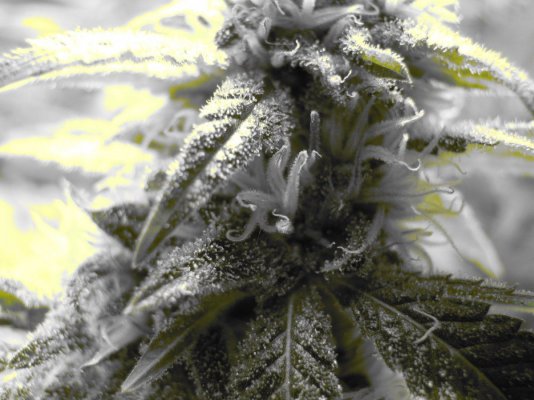
I figured that. Good lookin out man. Yeah I get the bars a lot too. The trick is the angle. If I tilt the camera a bit away from the bulb, or if I'm under the canopy to shield the light it helps a lot. The best thing to do is enter the room before the HPS comes on. My flash adds nice blue colo to my pics that are taken with the halides on. The editing program is on my phone it's a free app. called Adobe express. Here's a few more for you all to chew on. Let's get some more on here.
 

Attachments

  • harvest2 020.JPG
    harvest2 020.JPG
    143.4 KB · Views: 121
  • harvest2 022.JPG
    harvest2 022.JPG
    115.9 KB · Views: 99
  • harvest2 027.JPG
    harvest2 027.JPG
    164.5 KB · Views: 133
  • harvest2 049.JPG
    harvest2 049.JPG
    139.7 KB · Views: 99
  • grow juurnal 367.JPG
    grow juurnal 367.JPG
    121.9 KB · Views: 109
  • grow juurnal 336.JPG
    grow juurnal 336.JPG
    128 KB · Views: 91
  • grow juurnal 353.JPG
    grow juurnal 353.JPG
    85.5 KB · Views: 100
  • thanksgiving 2010 181.JPG
    thanksgiving 2010 181.JPG
    148.8 KB · Views: 101
  • thanksgiving 2010 252.JPG
    thanksgiving 2010 252.JPG
    121.9 KB · Views: 106
  • thanksgiving 2010 264.JPG
    thanksgiving 2010 264.JPG
    119.8 KB · Views: 87
  • thanksgiving 2010 237.JPG
    thanksgiving 2010 237.JPG
    115.2 KB · Views: 109
  • thanksgiving 2010 261.JPG
    thanksgiving 2010 261.JPG
    156.4 KB · Views: 87
Sorry old thread, but try this out for easy pics.

Take a magazine or a piece of cardboard and shield the top of the camera from the light coming down from your hood. (Hold your camera or phone under the magazine) You should have no bars and really nice shots, and you can take them all day long. Its not the light in the room bouncing off the walls, its the light coming straight down from the hood :)

Note: this will not get rid of all of the red spectrum in pics from the hps but it helps alot.
 
Great pics Rob!

To turn off Location Services (GPS tag) on your iphone 4, go into settings > Location Services > and click OFF, or you can set which apps Location Services is ON or OFF for. For instance, if you want to use the Maps/GPS app, you need to have location services on for Google Maps. Just make sure that Location Services is set to OFF for photos and camera, and you should be okay.

If there is a will there is always a way, so I would be wary of trusting a phone camera no matter what the settings it has if you are not legal. If you are legit, I wouldn't sweat it so much.
 
Every pic in my gallery was tsken with my phone. Just snapping shots not playin with the lights or anything.
IMAG0557.jpg
bluegun.jpg
IMAG0330.jpg
IMAG0257.jpg
 
G

ganjherbsmoke

Guest
taken with a droid under 20k watts
 

Attachments

  • IMG_20101018_142604.jpg
    IMG_20101018_142604.jpg
    184.5 KB · Views: 84
  • Maui.jpg
    Maui.jpg
    211.2 KB · Views: 104
  • IMG_20101018_142507.jpg
    IMG_20101018_142507.jpg
    211.7 KB · Views: 88
here are some I took with my new dope scope that attaches to the phones camera so I can check trics and see them on the screen.
 

Attachments

  • iphone_4_microscope_1.jpg
    iphone_4_microscope_1.jpg
    13.4 KB · Views: 81
  • tricom 072.JPG
    tricom 072.JPG
    105.7 KB · Views: 95
  • tricom 001.JPG
    tricom 001.JPG
    92.5 KB · Views: 96
  • tricom 004.JPG
    tricom 004.JPG
    102.3 KB · Views: 107
  • tricom 067.JPG
    tricom 067.JPG
    116 KB · Views: 78
That's a pretty dope scope you got there robz... where did you grip that up? ~ODB~
 
Page 1 of 1 · Replies 1–20 of 20
1
Back
Top Bottom