Log In Register

Spider Farmer AC10 PS issues.

  • Thread starter Thread starter Brother_Antioch
  • Start date Start date
  • Tagged users Tagged users None

Spider Farmer AC10 PS issues.

Brother_Antioch 14 Replies 1,873 Views
Page 1 of 1 · Replies 1–15 of 15
1
Brother_Antioch

Brother_Antioch

Posts
308
Reactions
599
Joined
Jan 14, 2025
Points
93
Hi there, folks.

Hoping someone has a bit more insight into this system than I have, and can possibly guide me through my issue. I bought the Spider Farmer AC10 power strip for my 2x4 tent to run my new setup. I am trying to get it to read the temperature, humidity etc. in the tent and use that as the triggers for my heater, humidifier and fan set up. However, no matter what I've tried or what configuration I've used, it absolutely will not read the temp/humidity/vpd in the tent. When I log into the app, under all the parameters it reads "- -" for each of them.

I've reached out to Spider Farmer several times over the last week regarding this issue, and their answer is a stock "Check your connections. Check the diagram". Now, I'm no Stephen Hawking but I'm a pretty intelligent fella and did all of this multiple times prior to even bothering them. When I inform them I've done that, the answer is, believe it or not, "Check your connections. Check the diagram". It's like talking to an exceptionally stupid wall, to be perfectly honest, and I'm almost at the stage where I'll pack it back up and return it. I would MUCH rather get it functioning properly and continue to build out the rest of the components to make it a completely automated system (as in, replacing components with SF versions so it all works together with my GGS controller which currently sits in its box as it's pointless at this point).

I have spent countless hours searching for answers in Google but can't seem to find anything relevant to my problem. So, as a last resort, I thought I'd reach out here to the community to see if anyone is using that particular product, and if so, how did you get it up and running. I have tried using different sensors (both the same, SF light/temp/humidity sensors) that came with the AC10 and with the GGS controller, yet neither does anything but blink a few times and show up as blanks on the app. I have made sure it's connected via blue tooth and it has a wifi connection with a very strong signal. I've tried different RJ12 cables in case that was the issue, but unless all the sensors and all the cables are deficient, that's not the issue.

If anyone has any thoughts on this, please feel free to chime in. Ask me any questions, I'll be sure to post detailed answers. If there is more information you need, I'll happily provide it (so long as it's not, "What's your credit card number so I can check the order"...lol) I'm not quite ready to give up on this system yet, as I'm sure it's something that I've missed or simply done incorrectly. Any and all help is more than appreciated!

Cheers,

BA.
 
Hi there, folks.

Hoping someone has a bit more insight into this system than I have, and can possibly guide me through my issue. I bought the Spider Farmer AC10 power strip for my 2x4 tent to run my new setup. I am trying to get it to read the temperature, humidity etc. in the tent and use that as the triggers for my heater, humidifier and fan set up. However, no matter what I've tried or what configuration I've used, it absolutely will not read the temp/humidity/vpd in the tent. When I log into the app, under all the parameters it reads "- -" for each of them.

I've reached out to Spider Farmer several times over the last week regarding this issue, and their answer is a stock "Check your connections. Check the diagram". Now, I'm no Stephen Hawking but I'm a pretty intelligent fella and did all of this multiple times prior to even bothering them. When I inform them I've done that, the answer is, believe it or not, "Check your connections. Check the diagram". It's like talking to an exceptionally stupid wall, to be perfectly honest, and I'm almost at the stage where I'll pack it back up and return it. I would MUCH rather get it functioning properly and continue to build out the rest of the components to make it a completely automated system (as in, replacing components with SF versions so it all works together with my GGS controller which currently sits in its box as it's pointless at this point).

I have spent countless hours searching for answers in Google but can't seem to find anything relevant to my problem. So, as a last resort, I thought I'd reach out here to the community to see if anyone is using that particular product, and if so, how did you get it up and running. I have tried using different sensors (both the same, SF light/temp/humidity sensors) that came with the AC10 and with the GGS controller, yet neither does anything but blink a few times and show up as blanks on the app. I have made sure it's connected via blue tooth and it has a wifi connection with a very strong signal. I've tried different RJ12 cables in case that was the issue, but unless all the sensors and all the cables are deficient, that's not the issue.

If anyone has any thoughts on this, please feel free to chime in. Ask me any questions, I'll be sure to post detailed answers. If there is more information you need, I'll happily provide it (so long as it's not, "What's your credit card number so I can check the order"...lol) I'm not quite ready to give up on this system yet, as I'm sure it's something that I've missed or simply done incorrectly. Any and all help is more than appreciated!

Cheers,

BA.
Hmm, I had a full kit in my 3x3 setup for a little fun tent what sensors are you hooking up exactly? I run one but mainly used the genius controller to run the sensors

Had the AC10
SF3000
6” fan
4” exhaust,
Genius controller
Sensor pro kit running

ATM I only have the exhaust, light and AC10 rest moved the the 4x4 to control the G5000

I don’t think spiderfarmer is active on the site anymore
 

Attachments

  • IMG_0290.jpeg
    IMG_0290.jpeg
    210.5 KB · Views: 1
I’ll have to pull out a spare sensor when I get a chance and try to run it through the AC10 atm I am just running that light on the app through the light itself with the strip just as a controllable power strip for both tents
 
Full basement tent growing 101. Pretty cool looking there @Mikedin
 
Hmm, I had a full kit in my 3x3 setup for a little fun tent what sensors are you hooking up exactly? I run one but mainly used the genius controller to run the sensors

Had the AC10
SF3000
6” fan
4” exhaust,
Genius controller
Sensor pro kit running

ATM I only have the exhaust, light and AC10 rest moved the the 4x4 to control the G5000

I don’t think spiderfarmer is active on the site anymore

Currently, the only spider farmer sensor I'm trying to get running is the one for temp/humidity/light (all in one). Because my humidifier and heater are not spider farmer, I had hoped to use that sensor as a trigger based on humidity and temperature through the AC10. I have the GSS controller as well, however I disconnected it from the system because all it can really do is give me a reading, and possibly control the SE4500 light I have in my tent.

If there is a better way to set it all up, believe me, I'm all ears!!! Unfortunately, the kit I bought didn't come with the RJ12 splitters, so I currently have a cable going from the Device out on the AC10 to the light/device splitter with the light coming from Light 1 and the second device line going to the sensor, as it shows in the diagrams. Here's what I'm currently running:

2x4 tent
SE4500 light
Vivosun aerostream h05 humidifier
AC Infinity Thermoforge T3 heater
Vivosun oscillating fan
6" desk fan for floor circulation
generic 4" inline exhaust fan with a 10" carbon filter
4" desk fan as an intake fan at the bottom on the opposite corner from the floor circulation fan.
AC10 PS and app all connected and working fine, just not the sensor.
GGS controller which looks really pretty beside the tent but isn't even currently powered up or connected at all.

I have all the various sensors and cables that came with the 2 kits, but without any RJ12 splitters (other than 2 of the 10 port splitters) I can't do it EXACTLY the way it shows in the diagrams. Spider Farmer hasn't been any help at all, unfortunately.

Cheers,

BA.
 
Just butted both tents up together so the wires reached 🤣
I'd best not show the g/f your set up. She'd absolutely FORBID me from upgrading! "There's no more room in the living room!" is the stock answer when I say "I'm thinking a second tent would be great". Slab on grade home, so no basement. Beautiful set up, btw.

Cheers,

BA.
 
Lord, Bless us and Save us! It looks like I've fixed the issue, NO thanks to Spider Farmer...

After Google searches numbering in the hundreds (okay, dozens) I FINALLY managed to crack the code of the internet and ask it the right question, in the right order, using the right combination of words (it's official, I just earned my Black Belt in Google). Turns out, what I needed to do was plug in the GGS controller, run an RJ12 cable from the Device port to the Device port on the AC10 PS. Then, I ran the sensor from the second Device port on the AC10 with another RJ12 cable. Then, I ran an RJ12 cable from the second Device port on the GGS controller into the Device/Light splitter and from that into my SE4500. This basically bypasses the AC10 "brain" and gives all control to the GGS controller...(Duh...)...leaving me with 20 minutes of reprogramming all the outlets and environmental parameters...yet again...lol.

I have to say, after literally stumbling over the answer (*nods in direction of Google Black Belt*) Spider Farmer could have done a MUCH MUCH MUCH (and on and on) better job of laying out how to connect things. That being said, my confidence in their products is now fully restored. Over the course of the year I'll be replacing my heater and humidifier and clip fans with their brand so it will all work together in a cohesive and coherent system. At that point, I believe, I'll be able to run the tent off VPD settings. For now, the heater and humidifier are being triggered by min/max settings for temperature and humidity, and the controller tells me the current VPD, so it's just a matter of fine-tuning the temp/humidity to reach that sweet spot.

Thanks to all who chimed in, and if anyone needs any help with their system, go deal with Spider Farmer yourself!!! feel free to ask and I'll try my best to pass on my somewhat limited experience!

Cheers,

BA.
 
I'd best not show the g/f your set up. She'd absolutely FORBID me from upgrading! "There's no more room in the living room!" is the stock answer when I say "I'm thinking a second tent would be great". Slab on grade home, so no basement. Beautiful set up, btw.

Cheers,

BA.
Brother that’s just my basement bedroom haha

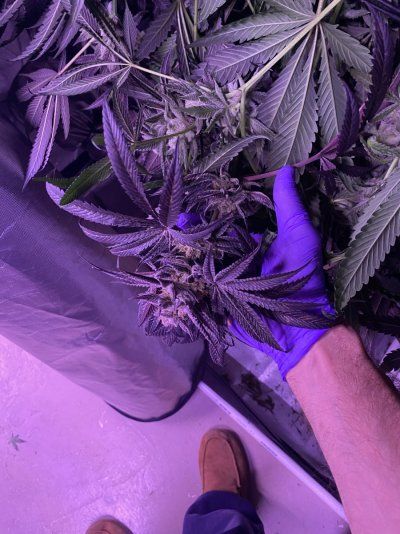
Just chopped one today from that big SF tent since it’s a winter storm outside nothin else to do lol

Pic of the her upside down is in my utility room where I had an empty 4x4 to hang her in next to the 4x8
 

Attachments

  • IMG_4729.jpeg
    IMG_4729.jpeg
    267.5 KB · Views: 1
  • IMG_4732.jpeg
    IMG_4732.jpeg
    167.5 KB · Views: 1
  • IMG_4733.jpeg
    IMG_4733.jpeg
    250.3 KB · Views: 1
  • IMG_4734.jpeg
    IMG_4734.jpeg
    298.2 KB · Views: 1
  • IMG_4735.jpeg
    IMG_4735.jpeg
    229.3 KB · Views: 1
  • IMG_4736.jpeg
    IMG_4736.jpeg
    227 KB · Views: 1
  • IMG_4737.jpeg
    IMG_4737.jpeg
    221.2 KB · Views: 1
  • IMG_4738.jpeg
    IMG_4738.jpeg
    107.8 KB · Views: 1
That’s a 2x4x4 2x2x30” a 3x3 and a 4x4 in my bedroom then a 4x4 and a 4x8 in the utility room for reference lol

My wife gave me the ol “only one tent” speech too 🤣
 
Lord, Bless us and Save us! It looks like I've fixed the issue, NO thanks to Spider Farmer...

After Google searches numbering in the hundreds (okay, dozens) I FINALLY managed to crack the code of the internet and ask it the right question, in the right order, using the right combination of words (it's official, I just earned my Black Belt in Google). Turns out, what I needed to do was plug in the GGS controller, run an RJ12 cable from the Device port to the Device port on the AC10 PS. Then, I ran the sensor from the second Device port on the AC10 with another RJ12 cable. Then, I ran an RJ12 cable from the second Device port on the GGS controller into the Device/Light splitter and from that into my SE4500. This basically bypasses the AC10 "brain" and gives all control to the GGS controller...(Duh...)...leaving me with 20 minutes of reprogramming all the outlets and environmental parameters...yet again...lol.

I have to say, after literally stumbling over the answer (*nods in direction of Google Black Belt*) Spider Farmer could have done a MUCH MUCH MUCH (and on and on) better job of laying out how to connect things. That being said, my confidence in their products is now fully restored. Over the course of the year I'll be replacing my heater and humidifier and clip fans with their brand so it will all work together in a cohesive and coherent system. At that point, I believe, I'll be able to run the tent off VPD settings. For now, the heater and humidifier are being triggered by min/max settings for temperature and humidity, and the controller tells me the current VPD, so it's just a matter of fine-tuning the temp/humidity to reach that sweet spot.

Thanks to all who chimed in, and if anyone needs any help with their system, go deal with Spider Farmer yourself!!! feel free to ask and I'll try my best to pass on my somewhat limited experience!

Cheers,

BA.
Awesome! Glad you figured it out! I diddnt see you had the controller that was my suggestion as well, everything has to run back to controller for full control, if you get some funky beeping after 6-7 hours and readouts are blank that was an issue they had before they did a controller update so make sure you check for that, if not you’re probably updated and good to go!
 
That’s a 2x4x4 2x2x30” a 3x3 and a 4x4 in my bedroom then a 4x4 and a 4x8 in the utility room for reference lol

My wife gave me the ol “only one tent” speech too 🤣
Hmm...now I'm thinking, if I got a 4x8 with good climate control, I'd probably have enough room to put in a nice comfy cot to sleep in! That'd learn her good!!!

Cheers,

BA.
 
Awesome! Glad you figured it out! I diddnt see you had the controller that was my suggestion as well, everything has to run back to controller for full control, if you get some funky beeping after 6-7 hours and readouts are blank that was an issue they had before they did a controller update so make sure you check for that, if not you’re probably updated and good to go!

Well, I've got the latest update on all aspects of it, so it seems to be going well. The only issue I'm having now is that the controller and all other aspects are set to show me temperature in Fahrenheit but on the app itself it shows the temperature in Celsius. (never a dull moment, huh???) I can't seem to find out how to switch that over to F instead of C as all the info and charts for VPD and suggested temps are usually in F. Oh well, it only takes a few seconds to do the conversion, so not a big deal. Not sure if that's an App issue or if it's a phone issue, to be perfectly honest.

My seeds should be popping a tap root any day now, so once they're in seedling stage, I'll switch them over from the seedling starter kit I have to the DWC system. THEN I'll know if I've got all the bugs worked out! In the meantime, I just keep fine-tuning the environment and really enjoying the logging system on the controller and app. It's nice to see what my temps/humidity/vpd readings are over the course of 24 hours. I want to get it all dialed in prior to the plant going into the tent, that's for sure.

Cheers,

BA.
 
Okay, if you are still around after over a year, here is the solution:
On the App, make sure that you are back to where the components are listed, GGS, AC10, etc.,
at bottom, click on ME, then Temperature Unit, then select F, then Confirm. On the GGS Controller, turn the knob to Settings, then press knob in once, then it should be on Temperature Unit, then press knob once and turn knob to F, press knob again then press home button. Temps on both GGS and app should be in Fahrenheit now.
 
Page 1 of 1 · Replies 1–15 of 15
1
Back
Top Bottom