Log In Register

How To Make An Animated Gif

  • Thread starter Thread starter Desertboy
  • Start date Start date
  • Tagged users Tagged users None

How To Make An Animated Gif

Desertboy 23 Replies 4,502 Views
Page 1 of 2 · Replies 1–20 of 24
Desertboy

Desertboy

Posts
1,416
Reactions
3,810
Joined
Feb 11, 2010
Points
263
How to make an animated gif using gimp (Free tool, open source)

This is my gif
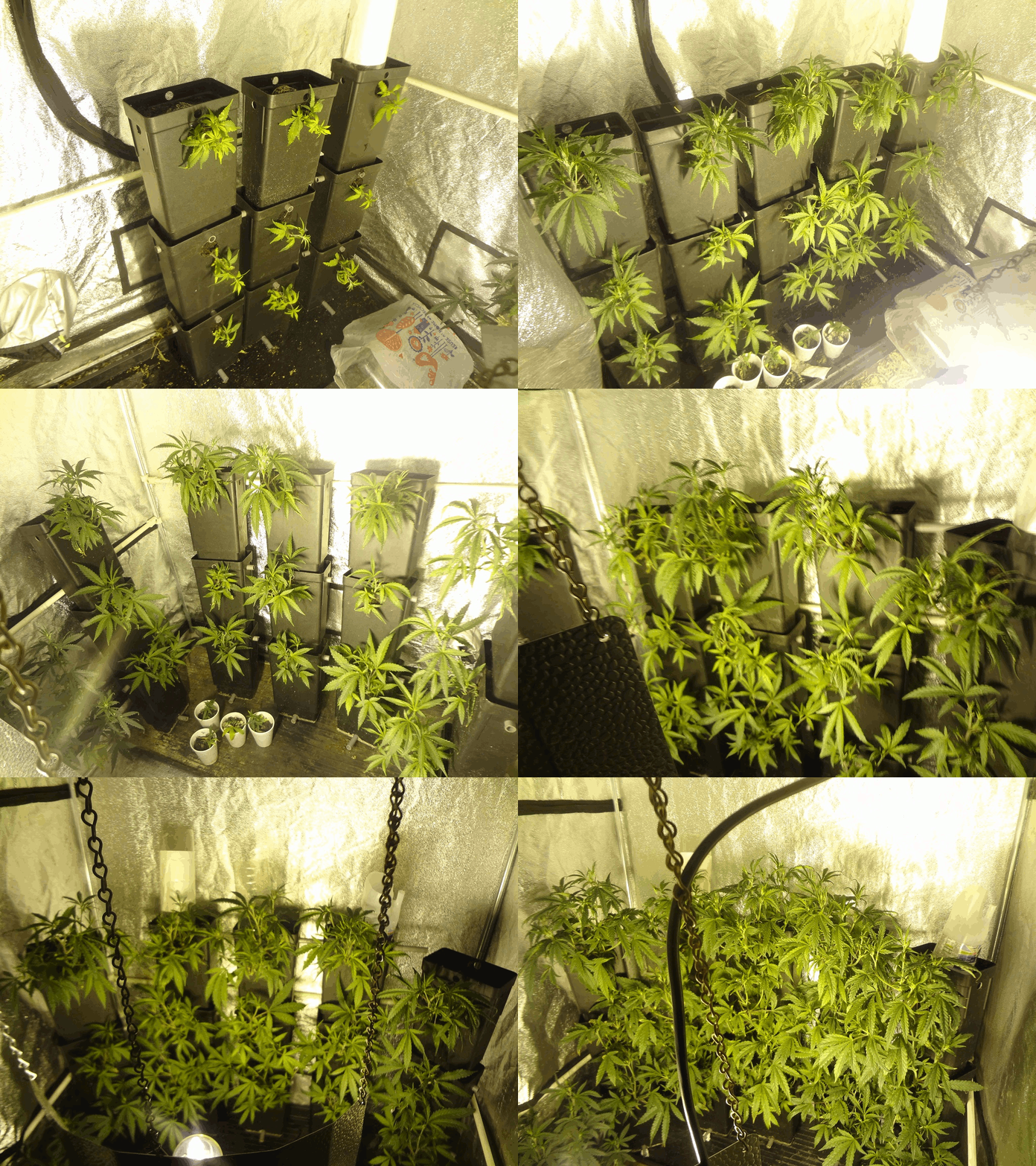


This is how to make one yourself in 5 minutes

1. Install gimp https://www.gimp.org/downloads/
2. Next open as layers
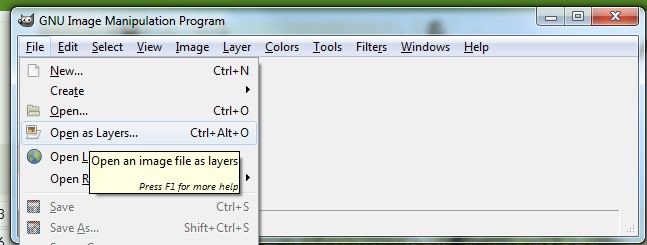
Layers

3. Make sure all files are named 01.jpg, 02.jpg, 03.jpg, etc. Then hold down left shift and click 01.jpg and click the last file in our case 09.jpg they should all be highlighted.
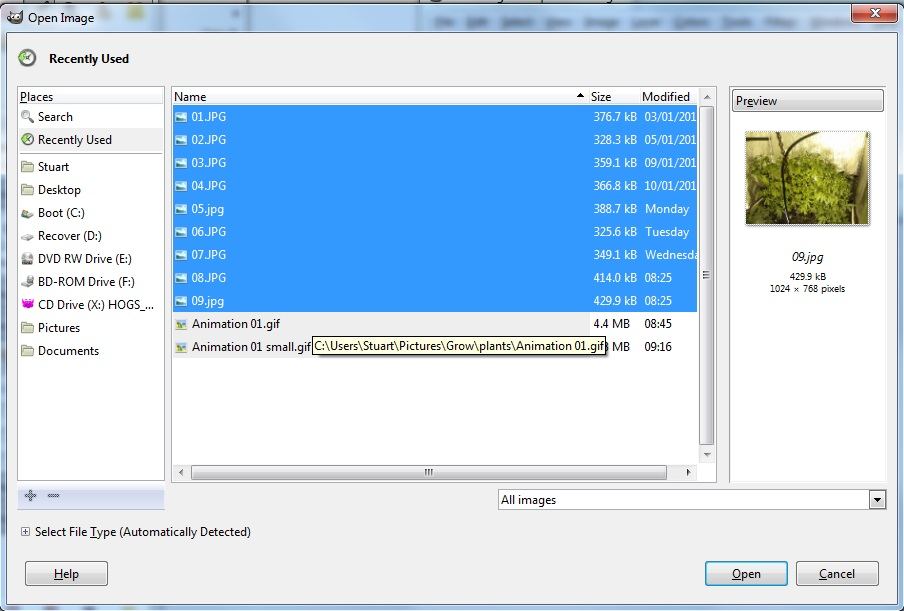
How to make an animated gif 2


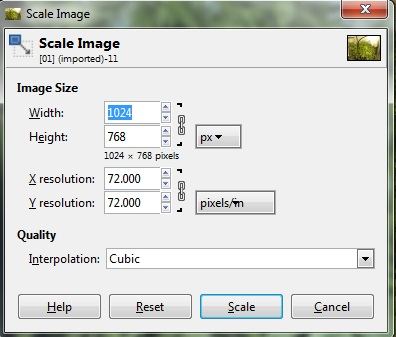
4. Scale image this will scale all the images, I chose 1024*768 but the smaller resolution the smaller the file is.
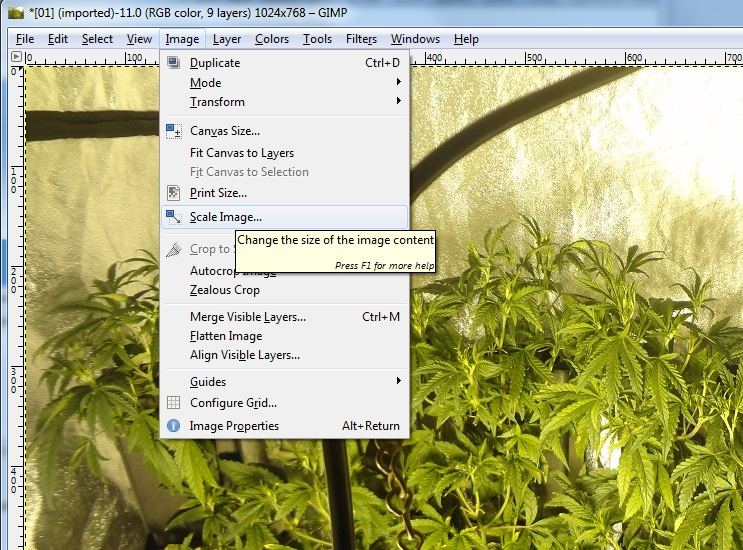
How to make an animated gif 3

Scale2

5. Export the file as a gif make sure filename is .gif!!!!
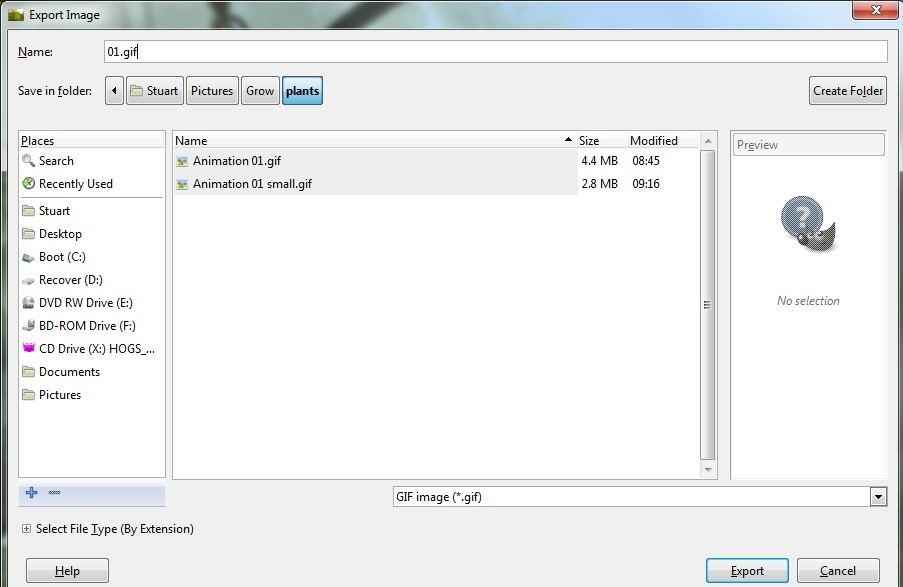
Export


Then make sure animate box is ticked and change delay to 1000ms (1 sec)
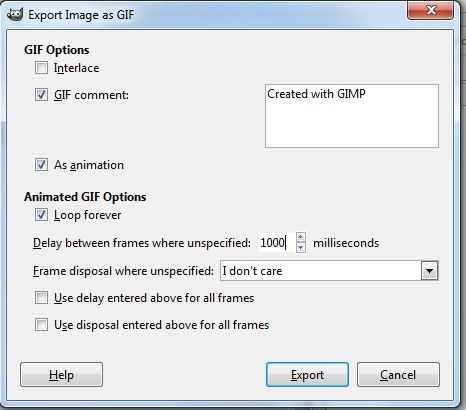
Export2


and export

I then hosted the file using Tor browser and this hosting service (Not all hosting works with tor) to anonymise my IP.


Copy the direct link and click the image button in the post options, paste the link into box or add IMG tags yourself.
 
Last edited:
@Desertboy ....one of my favourite tools in my selection for digital art...and its free with lots of support, opensource of course.

Great tutorial for those unfamiliar with gimp. Are you a digital artist?
 
Huh ?
Over this dummies head.

I putting 9 pictures together in an animated gif file
@Desertboy ....one of my favourite tools in my selection for digital art...and its free with lots of support, opensource of course.

Great tutorial for those unfamiliar with gimp. Are you a digital artist?

No but I love open source and gimp whilst scary when you first use it is not so difficult for a layman like myself to get acceptable results.

As soon as you understand layers gimp is really straight forward.
 
Huh ?
Over this dummies head.

I've took 9 photos from 9 days each photo a day or 2 apart, ordered the photo's by date and named them 01.jpg, 02.jpg, etc. Then I put them together to make an animation and saved them as a gif file (A picture format like jpeg but that also supports mini animations.) then I hosted the file on the internet and linked it to thcfarmer because thcfarmer has a limit on the size of uploads and the gif was too big.
 
I've took 9 photos from 9 days each photo a day or 2 apart, ordered the photo's by date and named them 01.jpg, 02.jpg, etc. Then I put them together to make an animation and saved them as a gif file (A picture format like jpeg but that also supports mini animations.) then I hosted the file on the internet and linked it to thcfarmer because thcfarmer has a limit on the size of uploads and the gif was too big.

Self taught, do not understand computer lingo.
 
I fucking LOVE GIMP! Thanks for sharing this. Do you happen to know what happened to the color and text selectors in the most recent edition of GIMP, though? It's really put a damper on my GIMPy shenanigans and I've gone over to Libre Draw to get certain things done.

I also LOVE Openshot for video editing. SUPER user-intuitive. It just tends to crash at saves.

Linux Mint Cinnamon here. I wonder if I can upload my favorite gif of all time.

Dave de Thor 1200speed
 
I fucking LOVE GIMP! Thanks for sharing this. Do you happen to know what happened to the color and text selectors in the most recent edition of GIMP, though? It's really put a damper on my GIMPy shenanigans and I've gone over to Libre Draw to get certain things done.

I also LOVE Openshot for video editing. SUPER user-intuitive. It just tends to crash at saves.

Linux Mint Cinnamon here. I wonder if I can upload my favorite gif of all time.

View attachment 564764
Hey isn't that PGD! Lol good one :D.
 
Yes, yes it is. One of my sisters took a gif I found... somewhere, it's been years, and she already had a bunch of pix with Dave, and then she sent me that. I about DIED the first time I saw it, too. Then we started working together, switched the beer to Pacifico, the papers to RAW. :D
 
I fucking LOVE GIMP! Thanks for sharing this. Do you happen to know what happened to the color and text selectors in the most recent edition of GIMP, though? It's really put a damper on my GIMPy shenanigans and I've gone over to Libre Draw to get certain things done.

I also LOVE Openshot for video editing. SUPER user-intuitive. It just tends to crash at saves.

Linux Mint Cinnamon here. I wonder if I can upload my favorite gif of all time.

View attachment 564764
Put a crutch in that mo fo and all lmao!
 
I fucking LOVE GIMP! Thanks for sharing this. Do you happen to know what happened to the color and text selectors in the most recent edition of GIMP, though? It's really put a damper on my GIMPy shenanigans and I've gone over to Libre Draw to get certain things done.

I also LOVE Openshot for video editing. SUPER user-intuitive. It just tends to crash at saves.

Linux Mint Cinnamon here. I wonder if I can upload my favorite gif of all time.

View attachment 564764

I think this might be my favorite thing on the internet
 
I use libredraw quite a bit this was made in libredraw, got to love open source tools, I used Ubuntu for years but I needed to CAD and soI'm stuck back with windows after 6 years of linux. I always use open source tools vs commercial.

View attachment 564862

There's LibreCad...

Linux Mint17 Rafaela , openSUSE and Fedora...will only run Windoze in virtual a environment.
 
Librecad 2d is excellent but the 3d doesn't cut it for me I need/want the extra bits you get with pro cad software it's mostly tools, realistic, 3d rendering, strength testing & materials.

I have 2 separate pc's one with windows and one with ubuntu/fedora dual boot I mostly use fedora now as I dislike the way ubuntu is going.

Never tried linux mint but I believe it's based on ubuntu and made really pretty and user friendly, took me a while to get used to linux but I grew up with pcs from '83 so it wasn't that hard either. I can imagine terminal is scary to new users that never saw a dos prompt.
 
Page 1 of 2 · Replies 1–20 of 24
Back
Top Bottom